Project workspaces
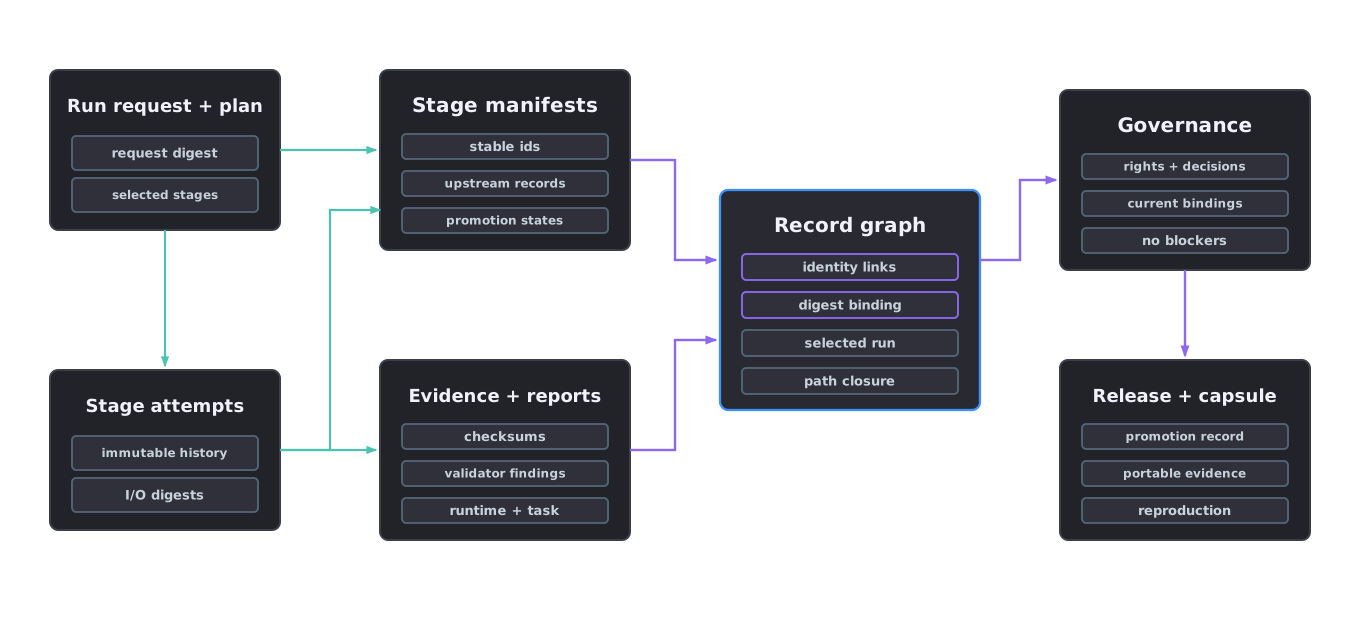
Every run writes a persistent project folder. The folder is the unit of replay, review and packaging.
Workspace boundary
A project workspace groups every stage output so the asset can be rebuilt, audited and varied with traceable provider responses, source copies, reports and checksums.
The workspace is also the boundary between immutable source material and generated work. Source files are copied in. Normalised, generated and authored artefacts are written beside the records that justify them.
How to inspect a workspace
Agent skill: asset-factory-orchestrator. The orchestrator normally creates and updates the workspace as it runs each stage end to end.
Treat the workspace as an audit packet. Start with project.json, then read run-plan.json and missing-evidence.json. Those three files state what the factory was asked to do, which route it chose and what still blocks release.
Then inspect manifests/ and reports/. Each generated file should trace back to a manifest entry, evidence record and checksum.
Required files
project.jsonrun-request.jsonrun-plan.jsonprovider-assignment.jsonvalidation-plan.jsonmissing-evidence.jsonwandb-run-plan.jsonmanifests/with per-stage records written asmanifests/<schema-name>.json, includingreconstruction-manifest.jsonfor candidate geometry andmesh-verification-record.jsonfor canonical promotion before downstream stage manifestsevidence/checksums.json, the exact SHA-256 inventory of every regular project file except the inventory itself and the ephemeral workspace lease; both exclusions and their fixed reasons are recorded in the filereports/source-assets/
Source handling
Source assets are copied into the project before normalisation or authoring. Source files are not mutated in place. The source manifest records original checksum, project-copy checksum, rights status and unit policy.
Workspace lifecycle
- Create or open the workspace.
- Copy source assets and write source manifests.
- Write run-plan, provider assignment and validation plan.
- Let each stage write manifests, reports, evidence and checksums.
- Package validated outputs and preserve blocked reports when gates fail.