SimReadyBench
A benchmark for simulation-ready OpenUSD asset reconstruction
Abstract
SimReadyBench evaluates how AI agents reconstruct simulation-ready 3D assets in OpenUSD (Universal Scene Description). Reconstruction tasks run in Harbor environments on a local Docker host or Daytona. A model receives reference views, nominal dimensions and an authoring brief, then produces a USD package for validation and comparison with the reference. Users can evaluate the public reference sets, define experiments over their own assets, models, harnesses and authoring skills or use the reconstruction tasks and rewards with an external reinforcement-learning trainer. Formal, visual and kinematic fidelity are reported independently.
Paper
The paper is coming soon.
Install and run your first benchmark
Use Python 3.12 on Linux or in an Ubuntu WSL shell. Install from the source checkout:
git clone https://github.com/hcltech-robotics/simreadybench.git
cd simreadybench
python3.12 -m venv .venv
. .venv/bin/activate
python -m pip install '.[daytona,publish]'
Set the model provider credentials, then choose where the benchmark runs. NV25 evaluates four reconstructions of each of its 25 public reference assets, giving 100 attempts with up to 64 authoring turns each.
Daytona
Set DAYTONA_API_KEY, then import the published runtime into your organisation:
simready-bench setup daytona --output ../simreadybench-runtime.jsonSetup saves the matching image configuration. Use it when starting the benchmark:
simready-bench benchmark nvidia-25 \
  --model gpt-6.1-sol --reasoning medium \
  --harness pi --deploy daytona --repetitions 4 \
  --runtime-images ../simreadybench-runtime.json \
  --authoring-turns 64 --workers 4 --supervise \
  --output-dir ../simreadybench-results
Local
Use a Linux Docker host with the CPU runtime images and their local-runtime-images.json configuration.
python -m pip install '.[validator]'
simready-bench benchmark nvidia-25 \
  --model gpt-6.1-sol --reasoning medium \
  --harness pi --deploy local --repetitions 4 --authoring-turns 64 \
  --runtime-images /tmp/srb-snapshot/local-runtime-images.json \
  --output-dir ../simreadybench-local-results
Open report.html in the output directory to inspect scores, generated USDs and orientation-aligned captures. Each completed reconstruction also enters scores.csv and results.json. Add --hf-repo YOUR_ACCOUNT/RESULTS --hf-run RUN_ID to publish completed reconstructions to Hugging Face during execution.
The default accounting allowance covers the permitted requests at full native provider capacity. Add --max-spend-usd AMOUNT to impose a monetary ceiling. On Daytona, --supervise restarts an interrupted coordinator against the saved run, and --resume reconnects its workers after closing the shell.
Connect a model provider
The selected model receives images and uses tools to author the asset. The same provider connection works with local and Daytona execution.
| Provider | Connection | Credentials |
|---|---|---|
| OpenAI | --provider openai --model gpt-6.1-sol --reasoning medium, using the Responses API | OPENAI_API_KEY |
| Hugging Face | --provider huggingface --model MODEL_ID:PROVIDER, using an image and tool-capable Inference Providers route | HF_TOKEN |
| Anthropic | Serve Claude through an OpenAI-compatible gateway, such as LiteLLM, and select its endpoint and capabilities in an operator policy | ANTHROPIC_API_KEY at the gateway and the gateway credential in the benchmark |
The provider configuration guide includes commands, endpoint settings, model capabilities and pricing for all three connections.
Build a benchmark over your own assets
Supply one OpenUSD asset or a JSON list of SimReady package entry points, with their composed layers and textures. SimReadyBench prepares the reference observations, constructs the Harbor tasks and evaluates each reconstruction against its source.
For example, save the following as references.json, with the packages under ./references:
[
  "cabinet/cabinet.usd",
  "drawer/drawer.usda",
  "hinged_case/hinged_case.usd"
]
simready-bench benchmark references.json \
--assets-root ./references \
--model gpt-6.1-sol --harness pi \
--skills ./skills/usd --deploy daytona \
--runtime-images ../simreadybench-runtime.json \
--workers 4 --repetitions 4 --authoring-turns 64 --supervise \
--output-dir ../simreadybench-custom-resultsModels, harnesses and skill sets are independent experimental factors. Evaluate each combination with its own command and output directory, holding references and repetitions constant. Select Pi or OpenCode with --harness, supply authoring skills with --skills or omit it for the empty skill condition.
The configuration guide defines asset manifests, model connections and matrix examples. Each report records the selected conditions alongside the measurements.
Use reconstruction tasks for reinforcement learning
Use your own assets as reconstruction episodes and serve a trainable policy through an OpenAI-compatible model endpoint. SimReadyBench runs the Harbor environment, provides asset observations and validator feedback, then scores the submitted USD. Your trainer uses the recorded trajectory and terminal measurements to update the policy between episodes.
Harbor receives formal fidelity as simready_reward on a 0-100 scale. The final readout also contains independent formal, visual and kinematic composites, so a trainer can define an objective over the properties relevant to its assets.
{"simready_reward": 0.0}Each episode records the agent trace, candidate package, validator findings and fidelity measurements. The reinforcement-learning guide shows the policy endpoint, episode runner and reward readout for a custom asset.
How scoring and validation work
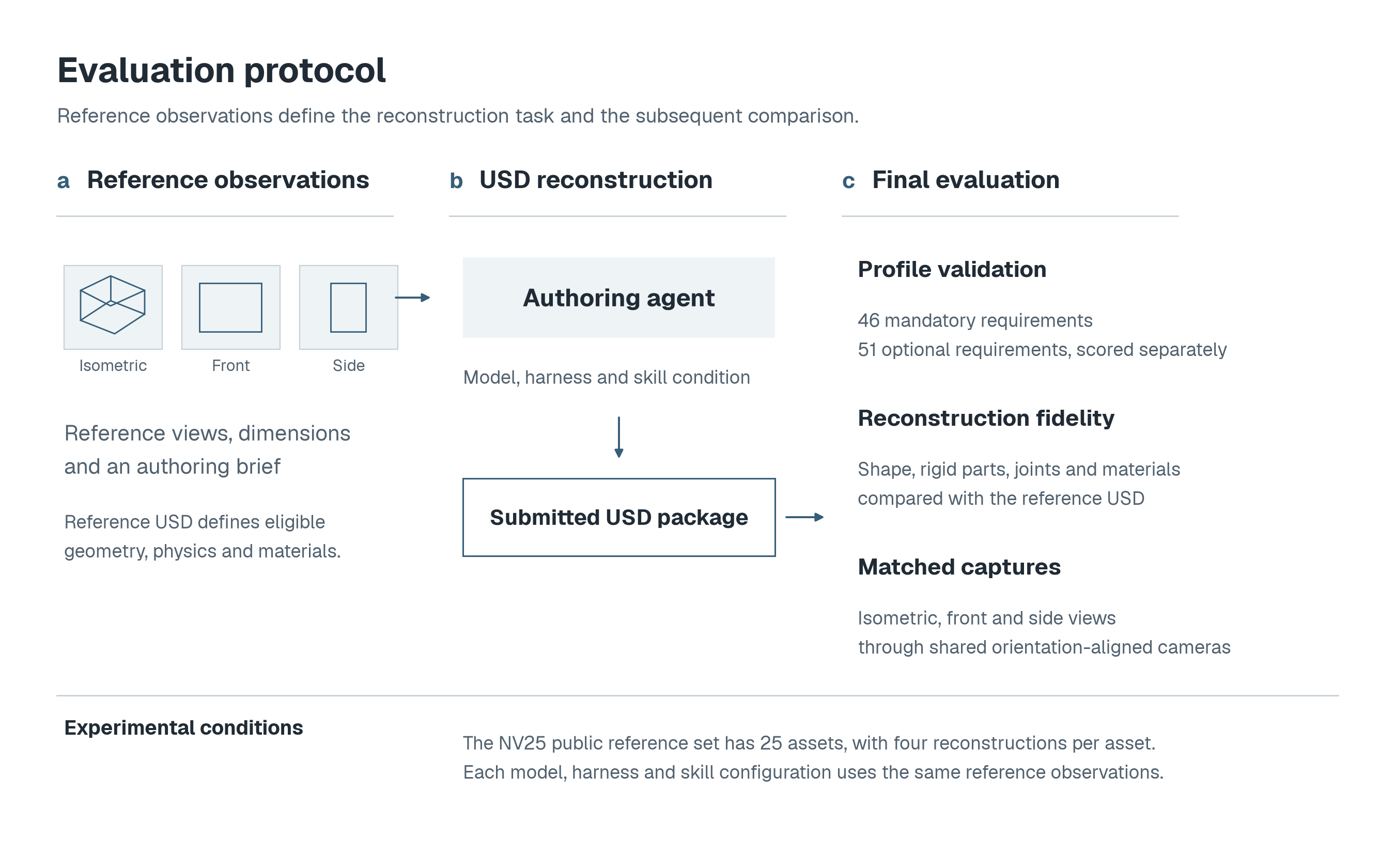
A reference USD supplies the geometry, dimensions and image for an independent authoring task. The agent uses the selected agent harness in a Harbor environment to create a new USD asset and can request validator feedback during reconstruction. The evaluator compares the final submission with the reference and renders both from matching cameras.
The NV25 protocol evaluates each combination of model, harness and skills over four reconstructions of each of its 25 assets, giving 100 attempts.
| Measure | Evaluation |
|---|---|
| Formal fidelity | Assets are evaluated according to the NVIDIA SimReady-Foundation Robotics-Prop 4.0.0 profile. The mandatory score is 95 times the fraction of 46 requirements passed, with five further points when all pass. Strict acceptance requires all 46. |
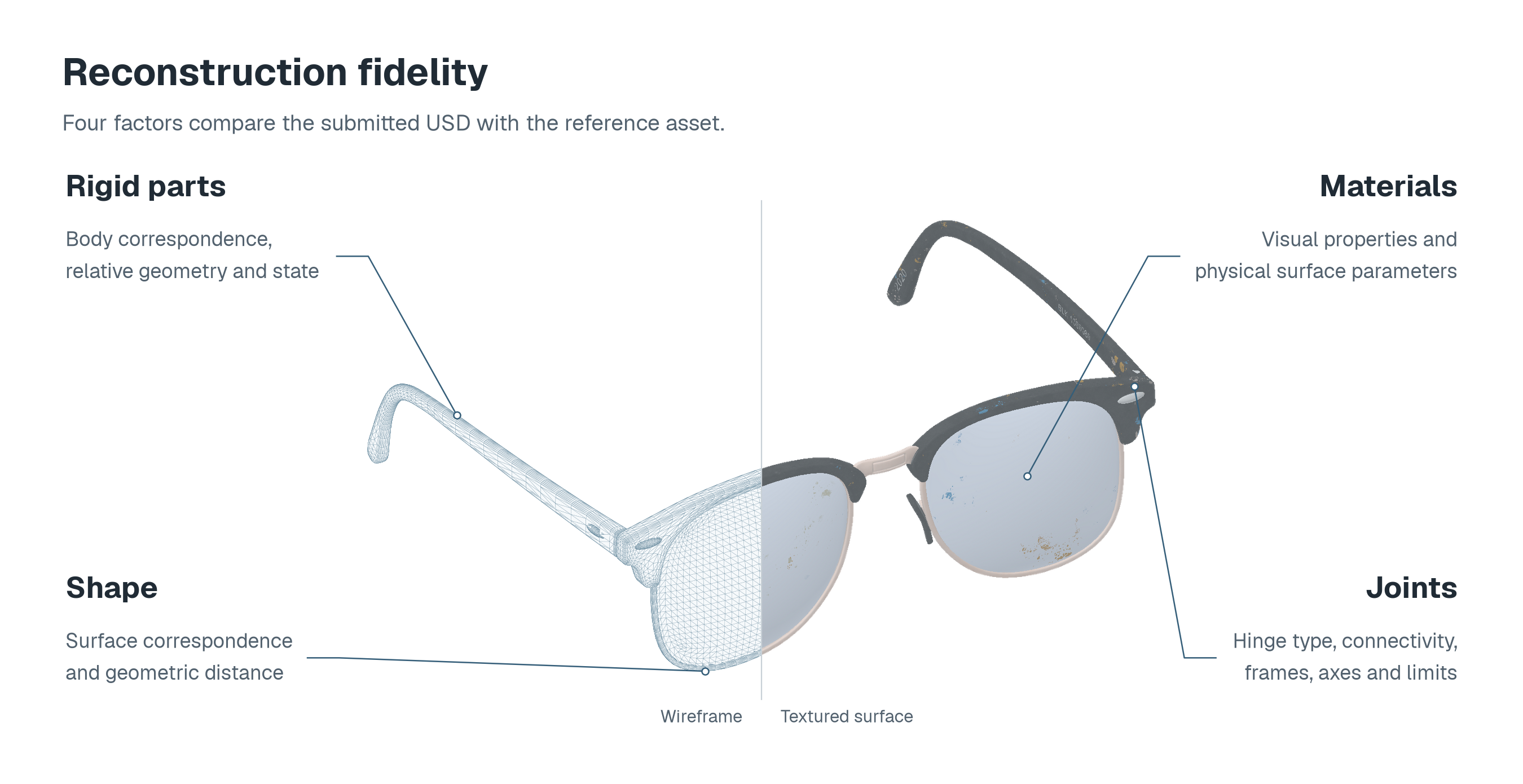
| Visual fidelity | The geometric mean of shape correspondence and appearance material correspondence. Colours, roughness, metallic response, opacity and supported textures are compared at reference surface samples. |
| Kinematic fidelity | Joint recovery and agreement of allowed motion after whole-object alignment. Missing and additional joints reduce the score, while fixed attachments and moving joints are evaluated separately. |
| Optional SimReady score | The 51 optional requirements are scored separately as 100 times the fraction passed. Unmeasured requirements retain score bounds and measurement coverage. |
| Shape | Bidirectional surface agreement after unit and up-axis normalisation and whole-object translation and yaw alignment. Physical scale and relative part transforms are preserved, with no scale fitting or independent part fitting. The same alignment defines the shared reference and reconstruction capture cameras. |
| Rigid parts | Surface agreement for corresponding bodies, combined with body count, joint inventory and enabled/kinematic state checks. |
| Joints | Joint types, connectivity, frames, axes, enabled states and motion limits. |
| Materials | Supported material values and textures at corresponding reference surface samples. |
Each fidelity component records its eligible reference coverage. Scoring documentation
Leaderboard
The NV25 public reference set contains 25 NVIDIA SimReady assets. Each entry reports formal, visual and kinematic fidelity across 100 reconstructions, with links to the per-asset measurements, generated USDs and captures.
| Model | Reasoning | Harness | Skills | Formal fidelity | Visual fidelity | Kinematic fidelity | Requests | Time | Tokens | Cost | Results |
|---|
View leaderboard on Hugging Face
Scores are means on a 0-100 scale. Requests, time, tokens and costs are means per reconstruction across all 100 attempts. A usage mean is shown only when every attempt has a measurement, with partial coverage shown otherwise. Costs are in USD. Counts sum passed requirements or earned fidelity credit over all eligible criteria, so their pooled fraction can differ from the mean score. Fidelity reference coverage is the mean across eligible reconstructions and is reported separately from the number of criteria measured. N/A means that no reference criteria apply, while an unmeasured result retains its missing score and any known bounds. Score definitions
Public reference sets
NV25 and NV100 are distinct public reference sets, separate from the withheld internal benchmark reference set. The packaged nvidia-25 manifest defines the 25 assets in NV25. Its standard protocol uses four reconstructions per asset for each model, harness and skill configuration.
Citation
Download the software citation
@software{voncsefalvay2026simreadybench,
  title = {SimReadyBench: Evaluating models, harnesses and skills
           for simulation-ready asset generation},
  author = {von Csefalvay, Chris and Foldi, Tamas},
  year = {2026},
  url = {https://github.com/hcltech-robotics/simreadybench}
}